
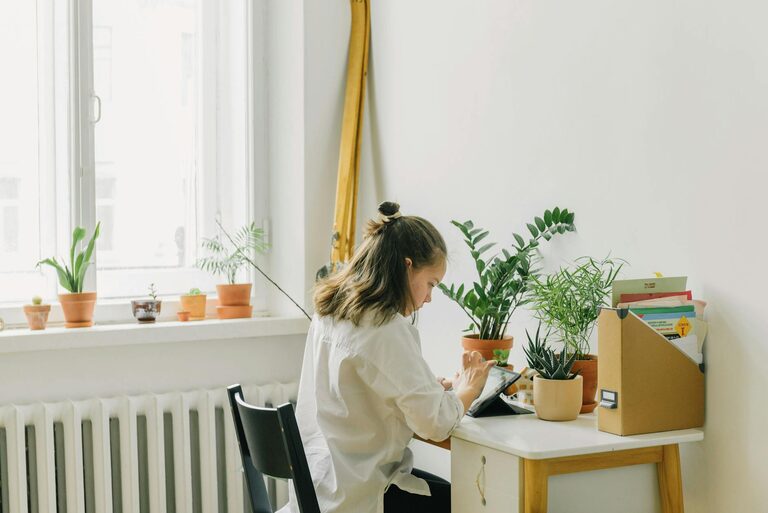
Creating a comfortable and relaxing home office environment is essential for maintaining productivity while working from home. When your workspace promotes calmness and efficiency, it becomes easier to focus, stay motivated, and complete tasks successfully. In this post, we’ll explore practical tips to help you design a home office that balances relaxation with work demands.
Why a Relaxing Home Office Matters
Spending hours working in a cluttered or uncomfortable space can lead to stress, distractions, and fatigue. On the other hand, a well-designed home office supports mental clarity, creativity, and sustained energy. When your environment feels inviting, you’re more likely to approach work with a positive mindset, reducing burnout and enhancing output.
Choose the Right Location
Find a Quiet Spot
Select a part of your home that is quiet and free from regular distractions, such as noise from the television or household traffic. An area with a door can add privacy and help delineate work time from personal time.
Consider Natural Light
Natural light not only brightens your workspace but also positively affects your mood and alertness. Position your desk near a window if possible, but be mindful of glare on computer screens. If natural light is limited, invest in a good quality desk lamp with adjustable brightness.
Prioritise Comfort and Ergonomics
Invest in a Supportive Chair
A comfortable chair with proper lumbar support can prevent back pain and improve posture. Adjustable features allow you to tailor the chair to your body, increasing comfort during long working hours.
Organise Desk Height and Position
Your desk height should allow your elbows to rest at about 90 degrees when typing. Your computer screen should be at eye level to avoid neck strain. Using monitor stands or adjustable desks can help achieve the ideal setup.
Declutter and Organise Your Space
Keep Essentials Within Reach
Arrange your most-used items such as pens, notebooks, and chargers within easy reach to reduce interruptions. Use organisers, trays, or drawers to keep these items tidy.
Minimise Distractions
A clutter-free desk promotes a clearer mind. Regularly clean and tidying your workspace to eliminate unnecessary items can improve concentration and reduce stress.
Incorporate Calming Elements
Use Soft Colours
Choose calming colours such as soft blues, greens, or neutrals for your walls or accessories. These hues tend to create a soothing atmosphere that helps reduce anxiety.
Add Plants
Indoor plants improve air quality and add a touch of nature to your workspace. Certain plants like peace lilies or snake plants are low maintenance and can enhance your environment’s tranquillity.
Personalise Thoughtfully
Including photos, artwork, or meaningful objects can make your workspace feel welcoming. However, keep personal items limited to avoid visual clutter.
Control Noise Levels
Use Noise-Cancelling Headphones
If you cannot eliminate background noise completely, noise-cancelling headphones can help you focus by blocking out distractions.
Incorporate Soothing Sounds
Playing gentle background music or nature sounds at a low volume may increase relaxation and concentration for some people. Experiment to find what works best for you.
Maintain Good Air Quality and Temperature
Good ventilation and a comfortable temperature contribute significantly to your overall comfort. Open windows for fresh air when possible, and use fans or heaters to regulate temperature. Avoid stuffy or overly warm environments that can cause drowsiness.
Establish a Routine and Boundaries
Set Clear Working Hours
Just as important as the physical setup, establishing a routine helps your mind switch between work and leisure modes. Define your working hours and stick to them to avoid overworking.
Take Regular Breaks
Incorporate short breaks throughout your day to stretch, rest your eyes, and recharge. Movement helps reduce muscle tension and boost focus when you return to work.
Keep Technology Organised
Tangling cables and multiple devices can add to distraction and clutter. Use cable organisers and wireless accessories where possible. Regularly update and maintain your devices to prevent technical issues that may disrupt your workflow.
Optimise Lighting for Video Calls
If your work involves video conferencing, ensure your face is well-lit. Position a light source in front of you to avoid shadows and avoid strong backlighting. This will make online communication clearer and reduce eye strain.
Maintain Cleanliness
Keeping your home office clean prevents dust buildup and creates a refreshing atmosphere. Clean your desk, keyboard, and screen regularly. Cleanliness directly impacts comfort and health over the long term.
—
Creating a relaxing home office involves combining comfort, organisation, and a calming atmosphere. By selecting the right location, prioritising ergonomics, controlling noise, and personalising with care, you can establish a productive workspace that supports both your work responsibilities and well-being. Start implementing these tips to enjoy a more pleasant and effective work-from-home experience.